How weird is this?
I’m using Internet Explorer 8 today; not by choice, but because some Microsoft websites whine about you using other browsers and I was doing research for a Microsoft related article. I have a favorite of the page I want to open. (The proper term is bookmark, but Microsoft insists on pretending that they invent everything, including all the stuff they steal from other software, so they didn’t use the term bookmark, like everyone else.) So, I press CNTRL+B.
Now, Control + B is actually the keyboard shortcut for another browser (Firefox). As proof that Microsoft knows full well what the real terminology for a saved Internet location in a browser should be, CTL+B opens the "Organize Favorites" window in Internet Explorer. This is a nice touch of Microsoft user interface usability from the boys in Redmond to understand that those of who don’t just use the software that came preinstalled on our computers are very likely to be used to the keyboard shortcuts of other browsers.
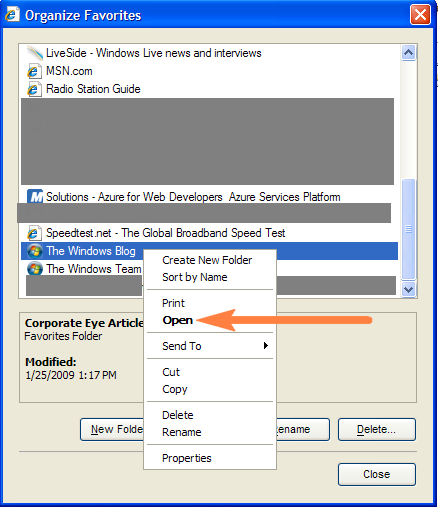
Still, it’s a little bit unexpected, because I’m expecting the sidebar or toolbar, or whatever that opens when you click on the little gold start to show up, but the Favorites window is fine, too. What is very weird, however, is trying to open a bookmark from this window.
Technically, the Organize Favorites window is not where you are supposed to be browsing and opening your favorites from. Nonetheless, following the standard Windows user interface paradigm, right-clicking on a bookmark brings up a context window which includes the option to Open the IE favorite that was clicked on.
At this point, I’m a little bit bummed, because what I really want to do is open the bookmark in a new tab, but it is still better than nothing, so I choose Open from the pop-up menu and…nothing.
I choose Open again. Again, nothing happens. After a few tries, I roll my eyes, give up, close the Organize Favorites window, click on the gold star, and open the bookmark from the sidebar. A few minutes later I switch over to Firefox for something else, and notice that there are 4 tabs open. Those four tabs are the ones that opened when I chose open.
Seriously?
Just to prove it to myself I tried it again, and sure enough, choosing Open from the context menu in Organize Favorites in IE 8 opens the bookmark in Firefox.
It is undoubtedly because Firefox is set as my default browser, but I still assumed that choosing Open in a IE favorites window would open the favorite in Internet Explorer.
I wonder if this behavior is intentional, or if in all of their testing, no one ever noticed this behavior. It is likely a felony at Microsoft HQ to have another browser installed as your default browser, so maybe it just never came up. Either way, Microsoft amused me today.
Haha that’s hysterical, thanks for sharing!