Wireless Networking Drops Connection Windows 7 Troubleshooting

Here we go again.

I had hoped this crap would be fixed in Windows 7, but apparently the long suffering Microsoft blunder known officially as NetBIOS / NetBEUI, and as NetKablooey by any experienced systems administrator or network administrator, just won’t die. Although Windows 7 itself doesn’t necessarily use NetBIOS anymore (a long ago abandoned local area network protocol, that among other things, would not scale to large networks) it still has it built in, presumably to handle the error-prone NetBEUI connections still out there on Windows XP machines all over the world.

If you have a wireless network that randomly drops connections even though your wireless adapter connects fine to the wireless network and Windows 7 says that nothing is wrong, and may even still show as connected based on the icon in your system tray, chances are you are being knocked off the wireless network by browser elections from the old NetBIOS network protocol. Basically, browser elections unleash a flurry of broadcast packets out onto the network, that for some reason are not handled properly and Windows 7 starts shutting down services to fix it.

Unfortunately, it seems that no one seems to know that this happens a lot and you will see post after post in wireless network troubleshooting forums or wireless help forums about computers that work just fine with the wireless network most of the time, but sometimes just drop the connection for no reason. The self-proclaimed experts in these forums answer with all of the same drivel that they do for any wireless connection problem: update your drivers, check your SSID, check your security settings, and then, when none of their worthless suggestions work, then they will tell you to blame your microwave, or buy a new wireless adapter or wireless router. They’ll even helpfully through in a brand name suggestion that has, “worked well for me in the past.” – WHATEVER!

Computer Browser Error Causes Wireless Network Connectivity Problem

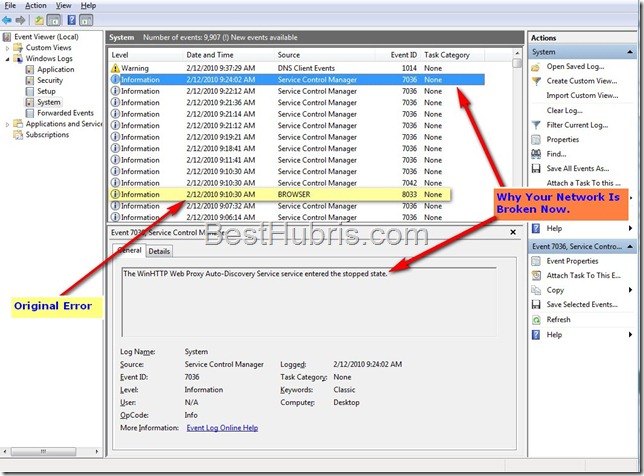
Here is what is really happening. You can prove it with your computer’s own system event logs. (The logs are under Administrative Tools -> Event Viewer -> Windows Logs -> System)

Depending upon how long it has been since your computer dropped its wireless connection and you look in the Event Viewer, these events may be right up at the top, or you may have to scroll down a bit to find them.

wireless-network-error-browser-election-disconnect The tale tell sign of Browser Elections from NetBIOS breaking wireless network connections is a pattern of 3 system events that all occur with the same timestamp. The easiest way to find them is to look for the Source of BROWSER. That will be the first of the three events. The other two events will be the TCP/IP NetBIOS Helper service was successfully sent a stop control, followed by The TCP/IP NetBIOS Helper service has been stopped.

wireless-network-error-tcp-ip-helper-stoppedThe next events may vary depending upon how your computer is set up, but will include one indicating that the TCP/IP NetBIOS has successfully started. This is why your Windows 7 system does not know that it has lost wireless connectivity. It THINKS the link is still working and will not change the system tray icon to show a disconnected network because TCP/IP (which is what it is actually using for networking) is working normally.

Unfortunately, another service gets knocked offline during this cascade of system events that does not get restarted. The WinHTTP Proxy Auto-Discovery Service, which should be completely unnecessary for a system using legitimate networking standards, enters the stopped state and does not restart.

wireless-network-error-winhttp-dns-errors This prevents your computer, not from networking and sending packets, but rather it prevents your system of having any idea what to do with that traffic. The stink of this whole thing is that if Windows 7 wireless networking worked well enough without all of these “helper” services, none of this would be a problem for Internet connections because the DNS Servers would still be running. But, Windows 7 wireless configuration is too dumb to use DNS Servers for Internet traffic, because it worries more about local area network traffic. Without one of the LAN services there to tell Windows to send those packets to the Internet and use the real networking protocols standards, it flails about like a helpless child.

Unfortunately, the next event is the one that gets the WARNING icon and label and it says that there is a DNS problem. Oh, that isn’t a Windows issue, is it? I guess you’ll need to go waste hours of your time seeing if there is a DNS error. Even worse, if you re-enter your DNS settings or otherwise change the configuration of your wireless adapter enough to cause a full network subsystem restart the problem will go away…until the next time, because the problem was not with the DNS configuration in the first place.

Troubleshooting Windows 7 Wireless Network Connection Errors

Here is where it really starts to suck.

If you know anything about computers or networking, you will try to troubleshoot wireless connections by disconnect and reconnect to the wireless network as a way to reset the connection. That won’t work, however, because connecting and disconnecting don’t check the status of the WinHTTP Proxy service.

Running the Windows 7 troubleshooter MIGHT work, if the system decides there is enough of a problem to completely restart the networking subsystem, in which case the WinHTTP Proxy Service gets sent a restart command. While this does restart the service, and restore a functioning wireless network, it does not take any notice of the fact that the system was stopped in the first place, or what caused it to crash originally, so nothing really gets fixed.

What can you do to permanently fix these wireless connection errors?

Go into Services (in Administrator Tools) and set Computer Browser to Disabled (you have to stop it first.) Then, this idiotic vestige of Microsoft blunders past won’t try and force elections to make itself the Master Browser, and thus won’t knock itself off of the wireless network. The only downside to this solution is if your network design sucks enough, or if you have old Windows XP computers sharing files and folders on your home network, you might not be able to connect to those computers by name.

You can solve this problem by using LMHOST files or other means of name resolution.

Theoretically, if there were only Windows 7 computers on your wireless network there would be no issue, with name resolution, but, you might STILL get knocked off the network because Windows 7 refuses to assume that there are no old and busted NetBIOS computers on your network until proven otherwise, which means every time you turn on a computer, or some invisible timer goes off, some computer will try and force a browser election and break the wireless connection again.

Update: Disabling the browser service is not enough. Computers can continue to be knocked off the wireless network by responding to the browser elections of other computers, it seems.

Additionally, other services besides WinHTTP Proxy may be disrupted and cause subsequent wireless networking problems. Users should go into Services Manager and sort by startup type. Then, scan for any Automatic processes that are no longer running and restart those as well.

Social Newtorking for Newbies

Social Networking PictureOk, here we go. I’m jumping into the world of social networking. Why? Because, online, social networking IS networking. Just like a local business owner should network via various organizations, an online business owner should network via various social networking sites. The theory is that if people already know and respect you, and they already know what you do then someday when they, or someone they know, needs a service or product that you provide they will of course come to you. This kind of networking leads to being able to run your business via Reverse Cold Calling instead of you always having to go find new clients. Of course, it doesn’t work this way if you are just in it to get clients. Go to a Rotary Club meeting and hand out fifty business cards only to never return and you can be sure that your “networking” will be a failure. On the other hand if you join Rotary, go to meetings every week, meet people, get to know them and generally become respected as a good member and a good person, then the business will come as a side affect of being a member. It won’t work the other way around.

So, with that premise in mind it is time to launch the social networking campaign. Since any attempt to simply join to get clients will result in failure, joining needs to be about both contributing and building a presents for each social network. And, therein, lies the catch. I don’t get social networking. It has never made any sense to me. I’ve been to Digg, and del.icio.us, and Twitter, and Facebook, and Myspace, and frankly I don’t get it. Oh, the idea of online bookmarks was a good one, but now that I have Foxmarks to synchronize my bookmarks I don’t need them on some website. The whole concept of social networking is that by finding other people like you, you can look at their bookmarks and find great new websites that you have never heard of, and vice versa. Sort of a Netflix recommendation via a matching person instead of via an anonymous matching profile. Sounds good, what could be the problem?

I’ve Got Morons to the Left of Me…

The problem, in a word, is jackassery. I’m going to copyright that, so don’t bother writing it down. Jackassery is the implementation or conception of ideas or actions that would only be committed by or appreciated by a jackass. Or, more Webster-ly: of or pertaining to being a jackass.

99.999% of people on the Internet are fine, normal people that while you may or may not have anything in common with, you would at least be willing to give the benefit of the doubt while you got to know them. One would assume that such a ratio would hold online as well. While that may or may not be the case, the hard truth is that fully 90% of all people who step forth to proclaim their opinions on social networking sites fall into the category of people you don’t want to hear a peep from. There are many sub-categories of these people including: the boring, the socially challenged, the pedantic, the banal, the copycats, and of course the morons. Check the front page of Digg and you will see not 15 very interesting stories that challenge and stimulate your thoughts, but rather 3 “funny news” stories, 1 “funny” Youtube link, 3 “I can’t believe <insert politician/newsmaker> did this” stories*, 5 “Unix is best, No Mac, No Umbuntu, Microsoft sucks” stories, and 3 “technology so new you can’t even buy it and even if you could what would you do with it” stories.

Obviously, these kind of stories don’t inspire me to read. If I want funny news I’ll go to Fark.com. If I want social commentary I’ll check sources that actually care about facts. If I want technology news, well…they might have me there. Anyway, every time I click the “find other people who also liked this” button or its equivalent I find people so nightmarishly moronic that I wonder if I should not have been reading that site in the first place lest my IQ dwindle just from being tangentially associated with such people.

Try It Again – This Time With Feeling

The truth is that I’m sure there are plenty of people out there who are not bozos. The problem is that they are harder to find. You see, the people that you actually want to know, and quite frankly those in a position to actually benefit from your products or services have lives. And, because they have lives they don’t spend all of their time building up their power and credibility on Digg or whatever. That means you won’t find them on the front page. You’ll find them through narrower searches and taking your time. I’m a “now” kind of guy so taking my time is not my forte. However, I am a business man, and as such I’m willing to put in the time to improve my business. Therefore, I will now be making a better effort at the whole social networking thing. I’ll be starting with Twitter. I really, really, don’t know what the heck this thing is for, but we’ll see if it can be for more than 15 year-olds telling each other what store they are in a the mall.

Wish me luck.

*”I can’t believe <someone> did this” stories tend to fall into the same categories over and over.

  1. Those who want to change the Internet and or those who sue that use use it (RIAA, Phone company execs, Congress)
  2. Conservatives (social networkers tend to be liberal overall — though conservative social networkers have certainly carved out their own niche, but you have to go find them.)
  3. T.V or Movie execs who make/change/buy/option/comment on/think about geek properties such as comic books, sci-fi shows or books, graphic novels, or old T.V. shows. Think “alt.nerd.obsessive” (thank you Simpsons)
  4. Celebrities